New GET API for retrieving contacts with an API token
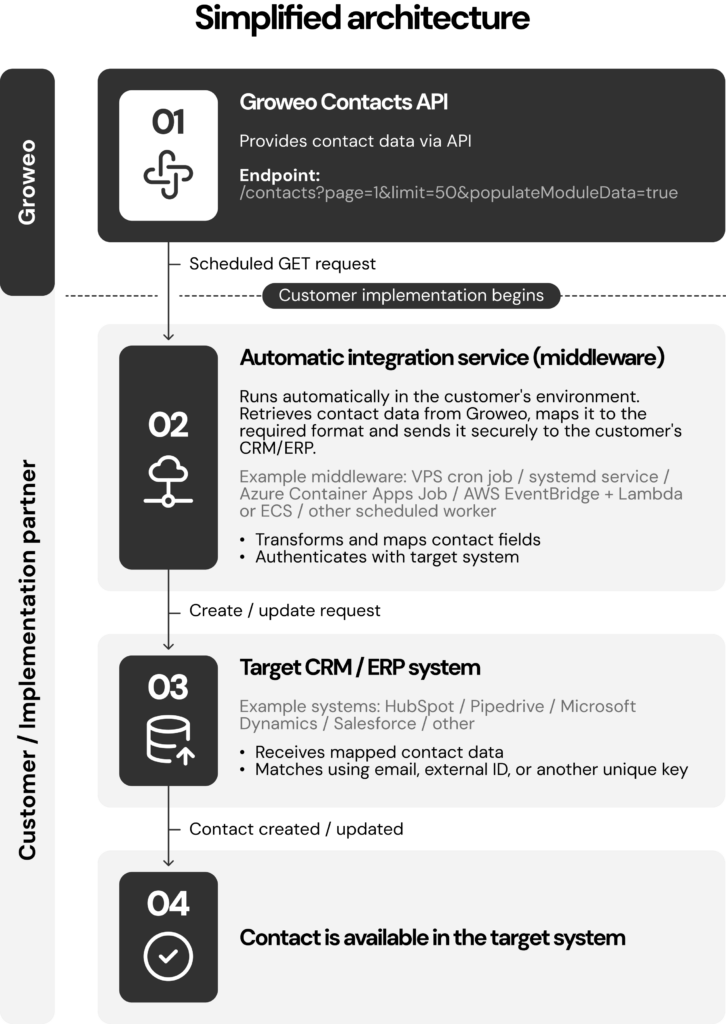
Groweo’s new GET API lets you retrieve contact data directly from Groweo in a secure and controlled way using an API token.
You can use the API when you need to read and use contact data stored in Groweo in an integration, a report or another system. This removes the need to export and transfer the data manually.
Access to the API and the API token are included in your Groweo® licence.
What can you do with the API?
The GET API allows your system to retrieve contact data from Groweo using an API token.
For example, you can use Groweo contact data in your own systems, make customer data available in another service or include it in your reporting.
Your Groweo contact person creates the API token and can revoke it when necessary. This keeps access management clear and controlled.
What can’t you do with the API?
The API is read-only. You cannot use it to add, update or delete contacts in Groweo.
Groweo does not send or receive contact data through a POST request. In practice, the API does not push data to external systems and cannot be used to submit new data to Groweo.
Who is the GET API for?
The API is useful if your company needs a secure, controlled way to retrieve contact data from Groweo for its own purposes.
It is particularly relevant when you want to use contact data in integrations, analytics or internal processes without manual exports. API access is included in your existing Groweo® licence.
How do I get access to the GET API?
Ask your Groweo contact person or Groweo Customer Support for an API token.
You can use the examples below with your technical partner or developer to test which data the API returns.
API examples
API examples
Choose language
You can switch between cURL-, PHP-, Python- ja Node examples jus by single click.
curl --location 'https://engine.groweo.com/engine/api/client-api/contacts?page=1&limit=50&populateModuleData=true' \
--header 'x-client-api-token: <YOUR_API_TOKEN_HERE>'<?php
$curl = curl_init();
curl_setopt_array($curl, array(
CURLOPT_URL => 'https://engine.groweo.com/engine/api/client-api/contacts?page=1&limit=50&populateModuleData=true',
CURLOPT_RETURNTRANSFER => true,
CURLOPT_ENCODING => '',
CURLOPT_MAXREDIRS => 10,
CURLOPT_TIMEOUT => 0,
CURLOPT_FOLLOWLOCATION => true,
CURLOPT_HTTP_VERSION => CURL_HTTP_VERSION_1_1,
CURLOPT_CUSTOMREQUEST => 'GET',
CURLOPT_HTTPHEADER => array(
'x-client-api-token: <YOUR_API_TOKEN_HERE>'
),
));
$response = curl_exec($curl);
curl_close($curl);
echo $response;
?>import http.client
conn = http.client.HTTPSConnection("engine.groweo.com")
payload = ''
headers = {
'x-client-api-token': '<YOUR_API_TOKEN_HERE>'
}
conn.request("GET", "/engine/api/client-api/contacts?page=1&limit=50&populateModuleData=true", payload, headers)
res = conn.getresponse()
data = res.read()
print(data.decode("utf-8"))const myHeaders = new Headers();
myHeaders.append("x-client-api-token", "<YOUR_API_TOKEN_HERE>");
const requestOptions = {
method: "GET",
headers: myHeaders,
redirect: "follow"
};
fetch("https://engine.groweo.com/engine/api/client-api/contacts?page=1&limit=50&populateModuleData=true", requestOptions)
.then((response) => response.text())
.then((result) => console.log(result))
.catch((error) => console.error(error));